Ms-Word Practice-02: Learn MS Word Formatting and Table Assignment with step-by-step tasks including page borders, headers, numbered lists, line spacing, table creation, and formula-based total calculation. Perfect for computer practical exams and classroom practice.
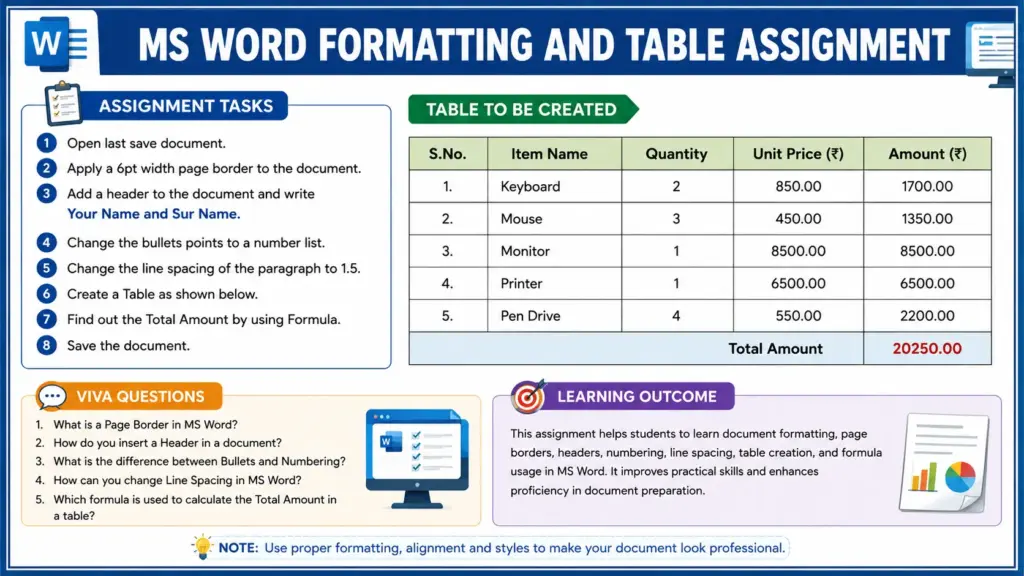
Ms-Word Practice-02: Learn MS Word Page Border, Header & Table Formula Assignment
Q.1 Open the last saved document.
Q.2 Apply a 6 pt Page Border to the document.
Q.3 Add a Header to the document and type your First Name and Surname.
Q.4 Convert all Bullet Points into a Numbered List.
Q.5 Change the Line Spacing of the paragraph to 1.5.
Q.6 Create a table as shown in the given sample.
Q.7 Calculate the Total Amount using the Formula feature in the table.
Q.8 Save the document with appropriate changes.