MS Paint Assignment-03: Practice MS Word Drawing and Logo Assignment with image-based questions. Learn to create shapes, draw objects, insert logos, apply formatting, and improve Microsoft Word design skills through practical exercises.
MS Paint Assignment-03
Q.1 Open MS Word and create a new blank document.
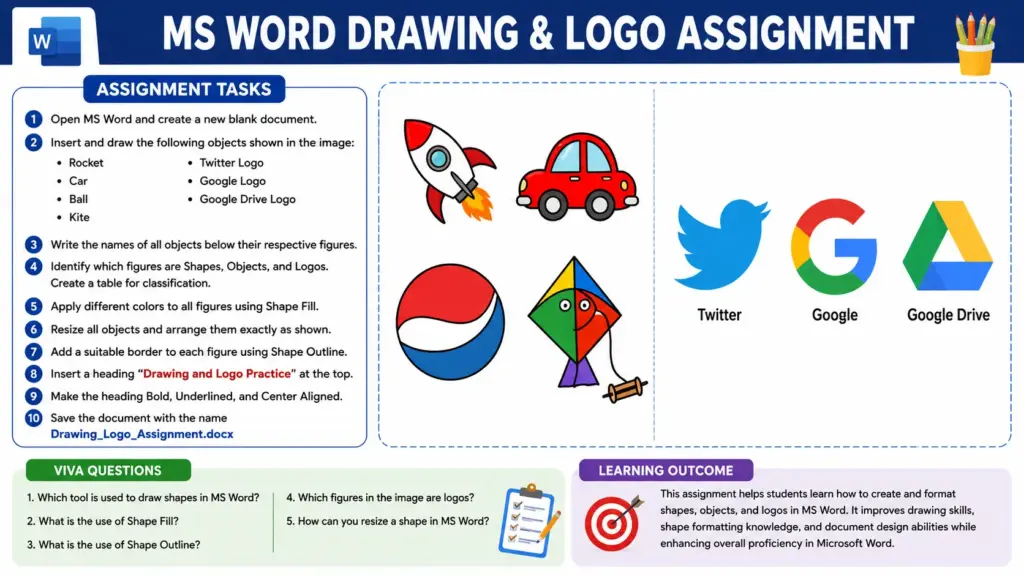
Q.2 Insert and draw the following objects shown in the image:
- Rocket
- Car
- Ball
- Kite
- Twitter Logo
- Google Logo
- Google Drive Logo
Q.3 Write the names of all objects below their respective figures.
Q.4 Identify which figures are Shapes, Objects, and Logos. Create a table for classification.
Q.5 Apply different colors to all figures using Shape Fill.
Q.6 Resize all objects and arrange them exactly as shown in the image.
Q.7 Add a suitable border to each figure using Shape Outline.

Q.8 Insert a heading “Drawing and Logo Practice” at the top of the page.
Q.9 Make the heading Bold, Underlined, and Center Aligned.
Q.10 Save the document with the name Drawing_Logo_Assignment.docx.
Viva Questions
- Which tool is used to draw shapes in MS Word?
- What is the use of Shape Fill?
- What is the use of Shape Outline?
- Which figures in the image are logos?
- How can you resize a shape in MS Word?
Conclusion (निष्कर्ष): MS Paint Assignment-03
This assignment helps students learn how to create and format shapes, objects, and logos in MS Word. It improves drawing skills, shape formatting knowledge, and document design abilities while enhancing overall proficiency in Microsoft Word.