MS Excel Practical-02

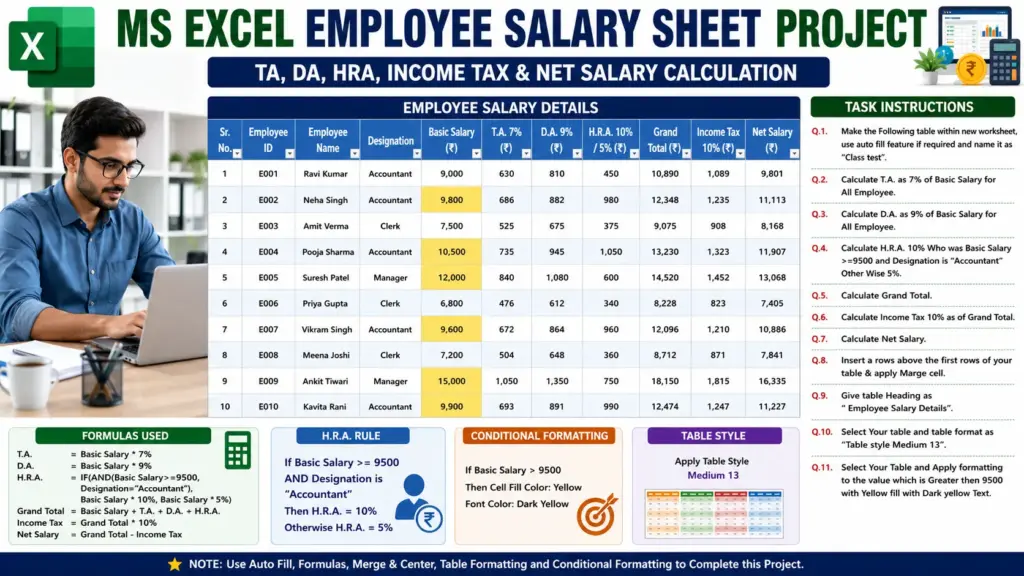
MS Excel Practical-02: Learn how to create an Employee Salary Details sheet in MS Excel. Calculate TA, DA, HRA, Grand Total, Income Tax, and Net Salary using formulas. Also apply table formatting, conditional formatting, and merge cells step-by-step.
MS Excel Practical-02

MS Excel Practical-02: MS Excel Employee Salary Sheet Project: TA, DA, HRA, Income Tax & Net Salary Formula Guide

Q.1.Make the Following table within new worksheet, use auto fill feature if required and name it as “Class test”.
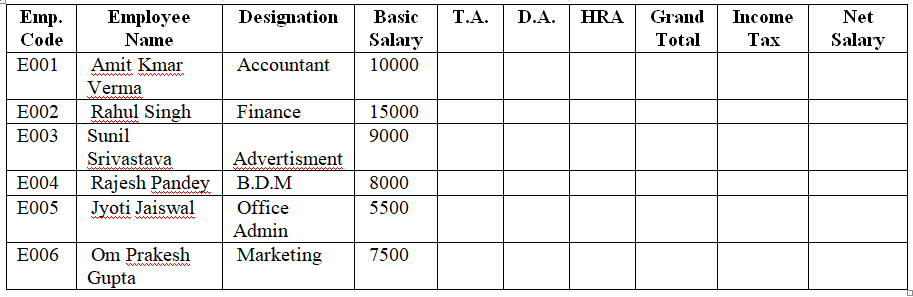
Employee Salary Sheet

Q.2. Calculate T.A. as 7% of Basic Salary for All Employee.

Q.3. Calculate D.A. as 9% of Basic Salary for All Employee.

Q.4. Calculate H.R.A. 10% Who was Basic Salary >=9500 and Designation is “Accountant” Other Wise 5%.

Q.5. Calculate Grand Total.

Q.6. Calculate Income Tax 10% as of Grand Total.

Q.7. Calculate Net Salary.

Q.8. Insert a rows above the first rows of your table & apply Marge cell.

Q.9. Give table Heading as “ Employee Salary Details”.

Q.10. Select Your table and table format as “Table style Medium 13”.

Q.11. Select Your Table and Apply formatting to the value which is Greater then 9500 with Yellow fill with Dark yellow Text.