Excel Assignment Practice 11: यह MS Excel असाइनमेंट विद्यार्थियों को डेटा प्रबंधन एवं फॉर्मेटिंग की व्यावहारिक जानकारी प्रदान करता है। इसमें निर्धारित शर्तों के आधार पर Fee एवं Hostel Fee की गणना, नई कॉलम जोड़ना, Text Orientation, Shrink to Fit तथा Wrap Text जैसी सुविधाओं का उपयोग करना शामिल है। इस असाइनमेंट के माध्यम से विद्यार्थी Excel में डेटा हैंडलिंग और फॉर्मेटिंग कौशल को विकसित करेंगे।
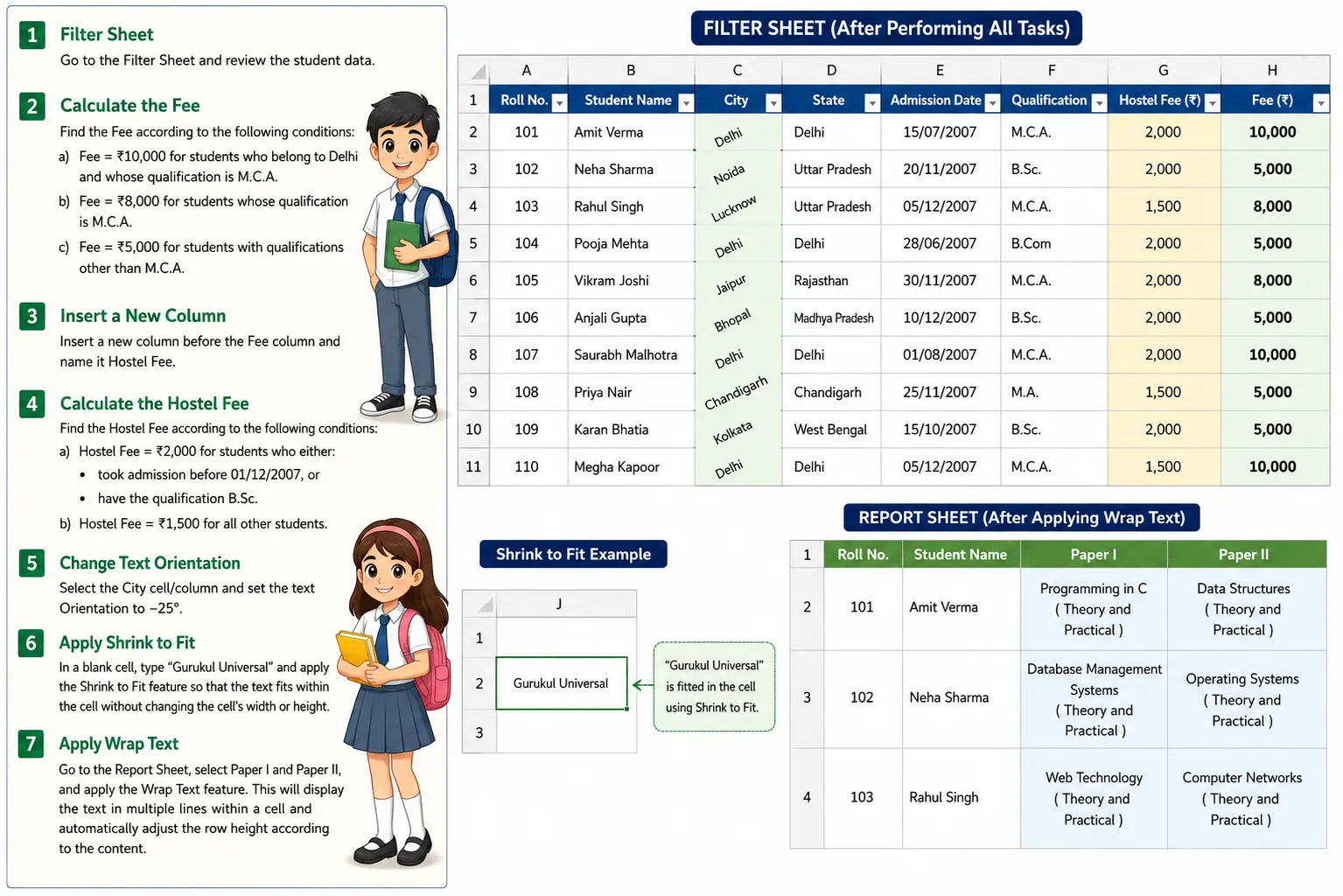
Excel Assignment Practice 11 में Conditional Fee Calculation और Formatting Assignment
Q.1. Filter Sheet
Go to the Filter Sheet and review the student data.
Q.2. Calculate the Fee
Find the Fee according to the following conditions:
a) Fee = ₹10,000 for students who belong to Delhi and whose qualification is M.C.A.
b) Fee = ₹8,000 for students whose qualification is M.C.A.
c) Fee = ₹5,000 for students with qualifications other than M.C.A.
Q.3. Insert a New Column
Insert a new column before the Fee column and name it Hostel Fee.
Q.4. Calculate the Hostel Fee
Find the Hostel Fee according to the following conditions:
a) Hostel Fee = ₹2,000 for students who either:
- took admission before 01/12/2007, or
- have the qualification B.Sc.
b) Hostel Fee = ₹1,500 for all other students.
Q.5. Change Text Orientation
Select the City cell/column and set the text Orientation to –25°.
Q.6. Apply Shrink to Fit
In a blank cell, type “Gurukul Universal” and apply the Shrink to Fit feature so that the text fits within the cell without changing the cell’s width or height.
Q.7. Apply Wrap Text
Go to the Report Sheet, select Paper I and Paper II, and apply the Wrap Text feature. This will display the text in multiple lines within a cell and automatically adjust the row height according to the content.