Excel Assignment Practice 04: Expense Calculation, ROUND, ROUNDUP, ROUNDDOWN, LCM, MAX, MIN, ROMAN और Comment Insert जैसे महत्वपूर्ण Excel Functions को आसान तरीके से सीखें। यह स्टेप बाय स्टेप गाइड छात्रों और कंप्यूटर कोर्स करने वालों के लिए बेहद उपयोगी है। Excel Practical Assignment को जल्दी और सही तरीके से पूरा करने के लिए सभी जरूरी फॉर्मूले और ट्रिक्स यहां विस्तार से दिए गए हैं। Beginners और CCC, ADCA, DCA छात्रों के लिए खास गाइड।
Excel Assignment Practice 04: Expense Calculation and Excel Functions
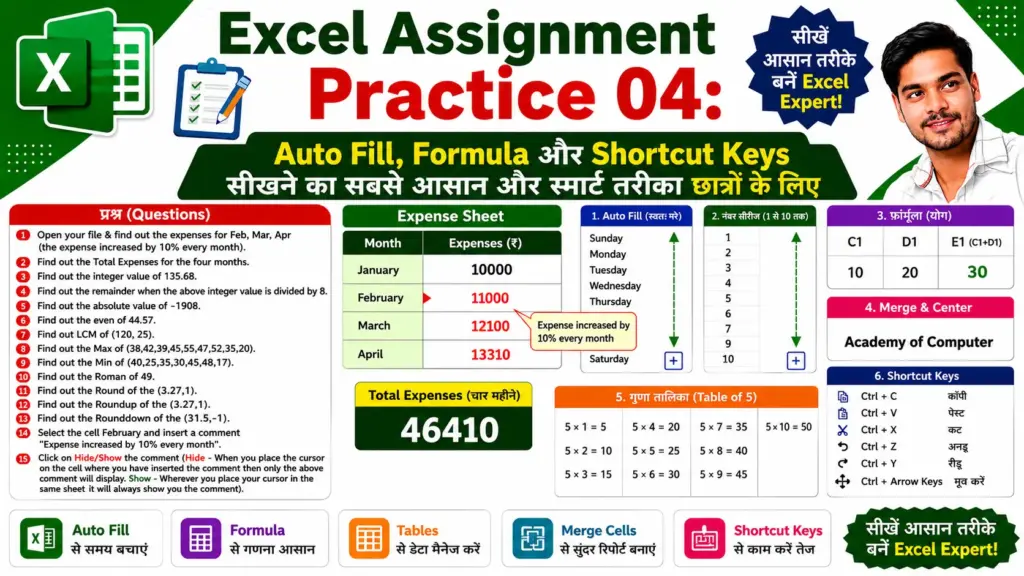
Q.1- Open your file & find out the expenses for Feb, Mar, Apr (the expense increased by 10% every month).
| Month | Formula |
| February | =January*10%+January |
| March | =February*10%+February |
| April | =March*10%+March |
Q.2- Find out the Total Expenses for the four months.
Q.3- Find out the integer value of 135.68.
Q.4- Find out the remainder when the above integer value is divided by 8.
Q.5- Find out the absolute value of -1908.
Q.6- Find out the even of 44.57.
Q.7- Find out LCM of (120,25).
Q.8- Find out the Max of (38,42,39,45,55,47,52,35,20).
Q.9- Find out the Min of (40,25,35,30,45,48,17).
Q.10- Find out the Roman of 49.
Q.11- Find out the Round of the (3.27,1).
Q.12- Find out the Roundup of the (3.27,1).
Q.13- Find out the Rounddown of the (31.5,-1).
Q.14- Select the cell February and insert a comment
Comment:
Expense increased by 10% every month
Steps:
- Select the February cell.
- Right click on the cell.
- Click on New Comment or Insert Comment.
- Type:
Expense increased by 10% every month
Q.15- Click on Hide/Show the comment.
Hide Comment:
- The comment will appear only when the mouse pointer is placed on the cell.
Show Comment:
- The comment will always remain visible on the worksheet.
Steps:
- Right click on the commented cell.
- Click on Show/Hide Comment.
Answer
A.2
Formula:
=SUM(January:April)
A.3-
Formula:
=INT(135.68)
Answer: 135
A.4-
=MOD(135,8)
Answer: 7
A.5-
Formula:
=ABS(-1908)
Answer: 1908
A.6-
Formula:
=EVEN(44.57)
Answer: 46
A.7-
Formula:
=LCM(120,25)
Answer: 600
A.8- Find
Formula:
=MAX(38,42,39,45,55,47,52,35,20)
Answer: 55
A.9-
Formula:
=MIN(40,25,35,30,45,48,17)
Answer: 17
A.10-
Formula:
=ROMAN(49)
Answer: XLIX
A.11
Formula:
=ROUND(3.27,1)
Answer: 3.3
A.12
Formula:
=ROUNDUP(3.27,1)
Answer: 3.3
A.13-
Formula:
=ROUNDDOWN(31.5,-1)
Answer: 30