Excel Assignment Practice 09: MS Excel Student Management Assignment डाउनलोड करें। इसमें Student Lookup, Table Transpose, Admission Date Sorting, Dropdown Selection और Format Painter जैसे महत्वपूर्ण टास्क शामिल हैं। यह असाइनमेंट छात्रों को Excel के फॉर्मूला, डेटा मैनेजमेंट और फॉर्मेटिंग स्किल्स सीखने में मदद करेगा।
Excel Assignment Practice 09: Student Lookup, Transpose Table, Sorting & Format Painter Tasks with Complete Guide
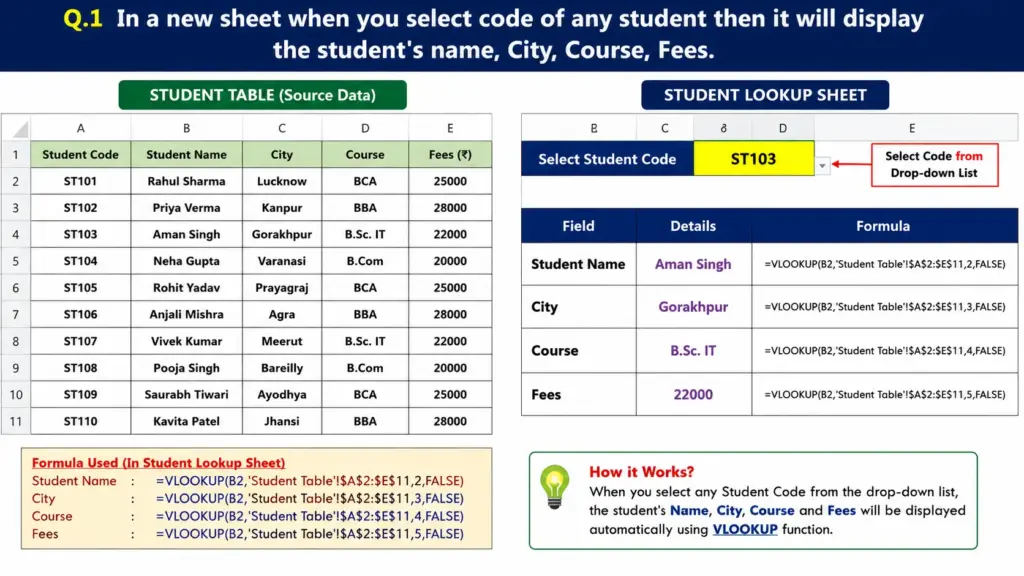
Q.1: Student Information Lookup
Create a new worksheet named Student Lookup. When a student code is selected, the worksheet should automatically display the following details:
- Student Name
- City
- Course
- Fees
Student Table Data
| Student Code | Student Name | City | Course | Fees |
|---|---|---|---|---|
| ST101 | Rahul Sharma | Lucknow | BCA | 25000 |
| ST102 | Priya Verma | Kanpur | BBA | 28000 |
| ST103 | Aman Singh | Gorakhpur | B.Sc. IT | 22000 |
| ST104 | Neha Gupta | Varanasi | B.Com | 20000 |
| ST105 | Rohit Yadav | Prayagraj | BCA | 25000 |
| ST106 | Anjali Mishra | Agra | BBA | 28000 |
| ST107 | Vivek Kumar | Meerut | B.Sc. IT | 22000 |
| ST108 | Pooja Singh | Bareilly | B.Com | 20000 |
| ST109 | Saurabh Tiwari | Ayodhya | BCA | 25000 |
| ST110 | Kavita Patel | Jhansi | BBA | 28000 |
Hint: Use VLOOKUP, XLOOKUP, or INDEX-MATCH functions.
Q.2: Transpose the Student Table
Make a copy of the Student Table and transpose it into a new area or worksheet.
Requirements:
- Convert rows into columns.
- Convert columns into rows.
Hint: Use Paste Special → Transpose.
Q.3: Display Student Details from the Transposed Table
Create a dropdown list containing student names from the transposed table.
When a student’s name is selected, display the following information automatically:
- Address
- City
- Date of Admission
Hint: Use Data Validation and HLOOKUP/XLOOKUP functions.
Q.4: Sort Student Admission Dates
Sort the Date of Admission column in the Student Table in Ascending Order (Oldest to Newest).
Requirements:
- All student records must remain together.
- Dates should be arranged from the earliest admission date to the latest.
Q.5: Apply Formatting Using Format Painter
Copy the formatting from the Expense Table and apply the same formatting to the Student Table using the Format Painter tool.
Formatting to be copied:
- Font Style
- Font Size
- Font Color
- Cell Borders
- Fill Color
- Alignment