Excel Assignment Practice 07: MS Excel Character Code एवं Text Functions Assignment छात्रों के लिए तैयार किया गया है। इसमें CHAR, CODE, CONCATENATE, UPPER, LOWER, PROPER और LEN Functions से संबंधित महत्वपूर्ण प्रश्न शामिल हैं। यह असाइनमेंट विद्यार्थियों को Excel के Text Functions को समझने और प्रैक्टिकल रूप से उपयोग करने में मदद करेगा। स्कूल, कॉलेज, कंप्यूटर कोर्स और परीक्षा की तैयारी करने वाले छात्रों के लिए यह एक उपयोगी अध्ययन सामग्री है, जिससे Excel कौशल को बेहतर बनाया जा सकता है।
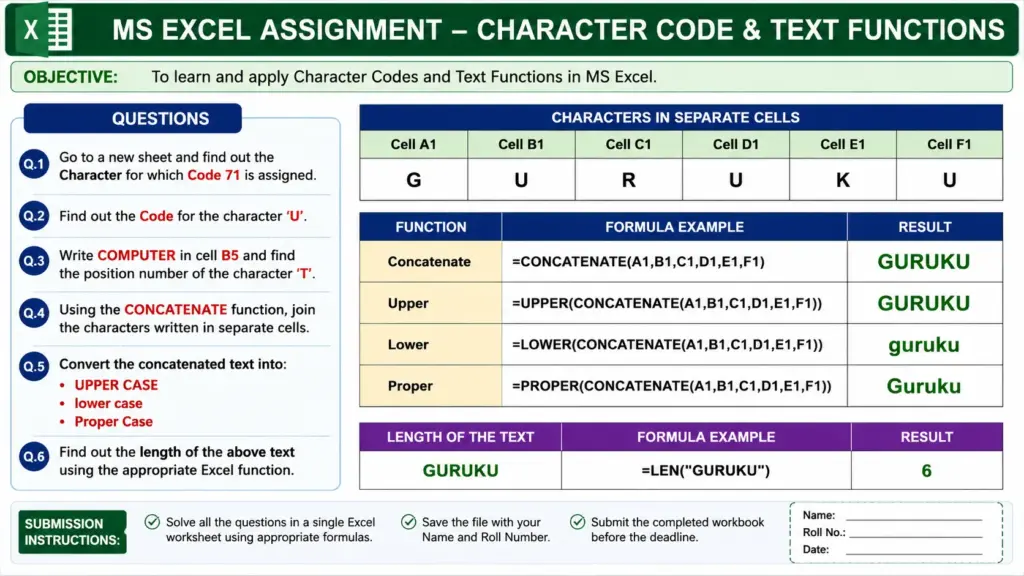
Excel Assignment Practice 07: Character Code और Text Functions के सभी महत्वपूर्ण प्रश्न
Q.1. Go to a new sheet and find out the Character for which Code 71 is assigned.
नई शीट पर जाएँ और पता लगाएँ कि Code 71 किस Character के लिए निर्धारित है।
Q.2. Find out the Code for the character ‘U’.
Character ‘U’ का Code ज्ञात करें।
Q.3. Write COMPUTER in cell B5 and find the Position Number of the character ‘T’.
Cell B5 में COMPUTER लिखें तथा Character ‘T’ की Position Number ज्ञात करें।
Q.4. Using the CONCATENATE Function, join the characters written in separate cells.
CONCATENATE Function का उपयोग करके अलग-अलग Cells में लिखे गए Characters को जोड़ें।
Q.5. Convert the concatenated text into the following formats:
Concatenate किए गए Text को निम्नलिखित Formats में परिवर्तित करें:
a) UPPER CASE
b) lower case
c) Proper Case
| Concatenate | Upper | Lower | Proper | |
| G | ||||
| U | ||||
| R | ||||
| U | ||||
| K | ||||
| U | ||||
| L |
Q.6. Find out the Length of the above text using the appropriate Excel Function.
उपयुक्त Excel Function का उपयोग करके उपरोक्त Text की Length ज्ञात करें।